
The eBay Fee Calculator: Work Out Your True Profit Before You List
Enter your selling details to instantly see your eBay fees, costs, and net profit across US, UK, AU, CA, DE and FR — a fast, free way to work out your true margin before you list.
Why an eBay Fee Calculator Matters
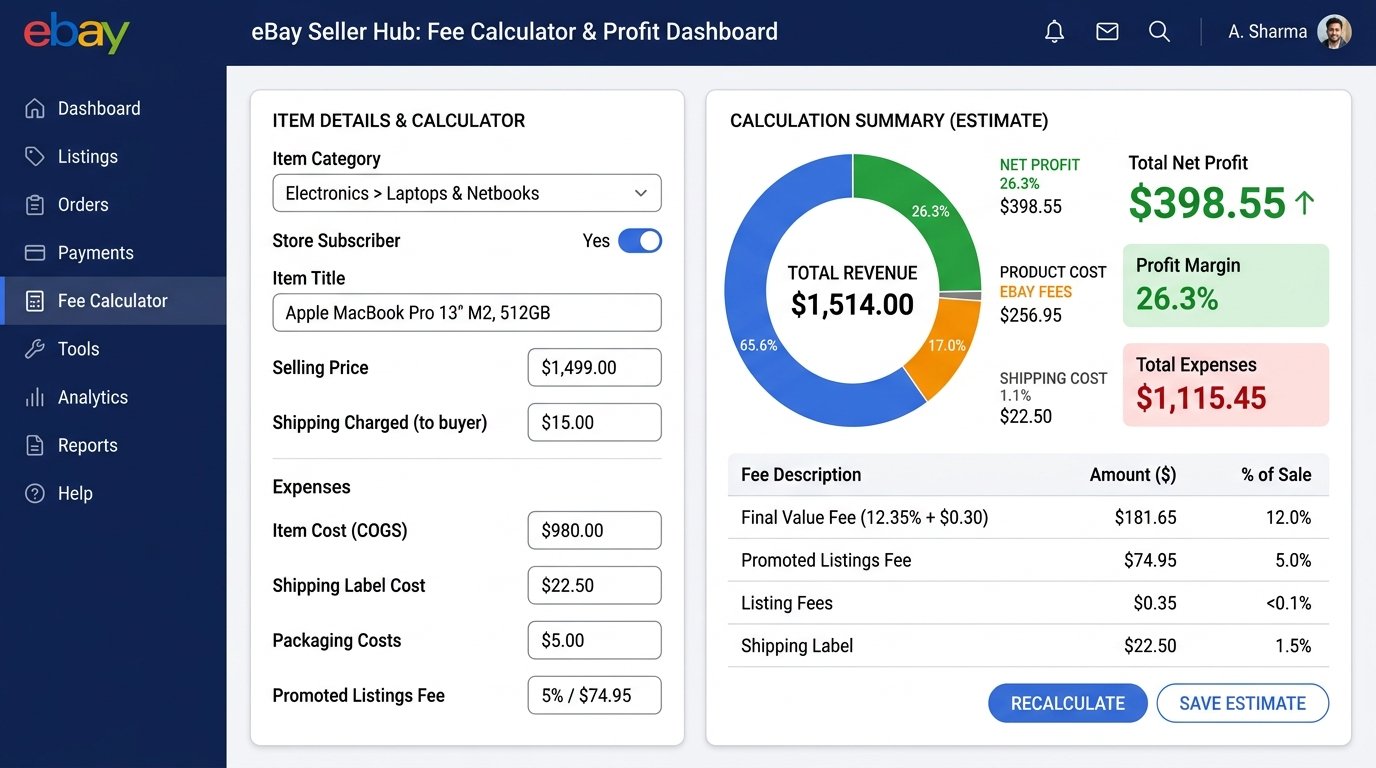
eBay's fees can quietly eat into your margin. Between final value fees, category rates, store subscription levels, and optional add-ons like Promoted Listings, the price a buyer pays is rarely the amount that lands in your account. An eBay fee calculator lets you enter your selling details and instantly see your fees, costs, and net profit — so you can price with confidence instead of guessing.
What the Calculator Works Out
Enter a few inputs and the tool returns a detailed fee breakdown and your net profit:
- Selling price — what the buyer pays
- Product cost — what the item costs you
- Shipping charges — postage you collect or absorb
- eBay fees — final value fee based on category and account
- Net profit — what's actually left after every deduction
Inputs You Can Configure
- Selling country — US, UK, AU, CA, DE, or FR
- Product category — final value rates vary by category, roughly from ~2.35% on heavy equipment up to ~14.95% on books, DVDs and music
- Account type — Private or Business
- Store subscription level — Starter through Enterprise
- Top Rated Plus status — eligible sellers receive a fee discount
- International sales — cross-border transactions can carry an extra fee
- Promoted Listings — factor in your ad rate to see the true cost of visibility
How to Use It
- Choose your selling country and product category.
- Enter your selling price, product cost, and shipping.
- Set your account type and store subscription level.
- Toggle any add-ons that apply (Top Rated Plus, international, promoted listings).
- Read your fee breakdown and net profit instantly.
Why It's Useful for Automation Sellers
If you run an automated or dropshipping eBay store, margins are often thin and volume is high — so a small miscalculation per order compounds fast. Running each product through a fee calculator before listing helps you:
- Avoid listing products that can't clear a healthy margin
- Compare categories and countries to find the most profitable mix
- Model the real cost of Promoted Listings before turning them on
- Set prices that stay competitive while protecting profit
Final Thoughts
A fee calculator turns eBay's fee structure from a guessing game into a simple, repeatable check. Know your true net profit before you list — not after your payout arrives.